How do I add a card to my wallet to track the balance?
With the Cryptonow Mobile App, you can add your Cryptonow card to your wallet to track your current balance at any time. Your crypto-assets are not transferred to the app and remain on the card.
You can use the Cryptonow Mobile App to add your Cryptonow card and conveniently track your balance at any time.
Step by step Guide
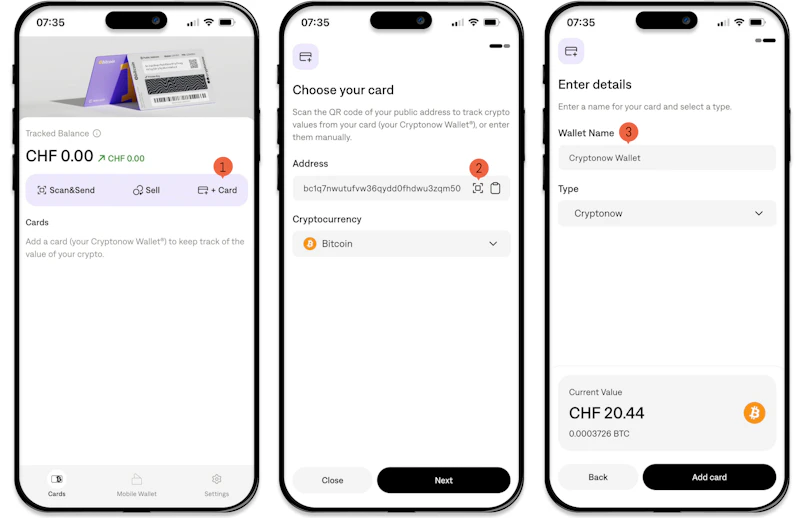
1. Open the Cryptonow Mobile App on your smartphone and tap on “Card.”
2. Scan the public address of your Cryptonow card using the automatically opened camera to load your wallet.
3. Enter a name for your card and tap on “Add card.”
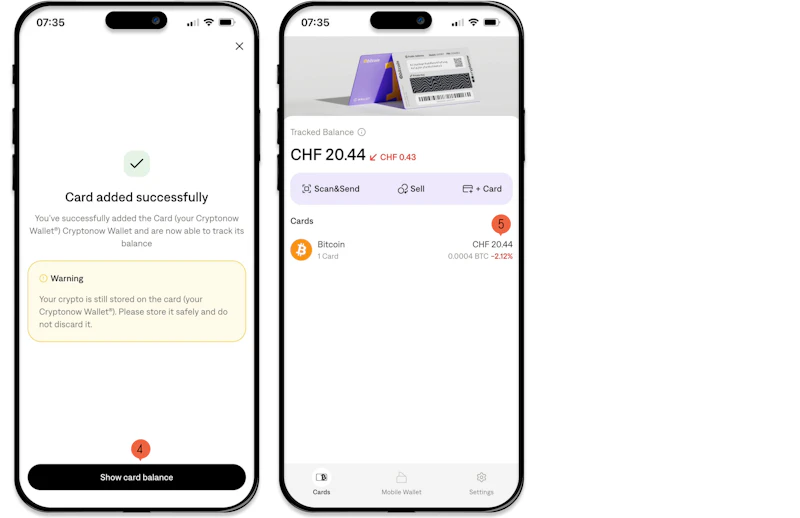
4. Tap on “Show card balance” to complete the process.
5. You will now see your card balance as “Tracked balance.” Your crypto-assets remain on the card after this process.
Important Note: When adding your card, only the public address is scanned to display the balance. Your crypto-assets on your Cryptonow card and are not transferred to the app.