How does Scan & Send work?
With the Scan & Send function, you can send crypto-assets directly from your Cryptonow card to another wallet address. To do this, simply scan the private key QR code on your card with the Cryptonow Mobile App and then confirm the transaction.
In the Cryptonow Mobile App, the Scan & Send function allows you to send crypto-assets directly from your Cryptonow card to another address. During this process, the private key of your Cryptonow card is scanned once and used for the transaction without permanently importing the wallet into the app. Please note that, depending on the crypto-asset, blockchain transaction fees may apply. This process allows you to send your crypto-assets quickly and flexibly without having to store your wallet permanently in an application.
Step by step Guide
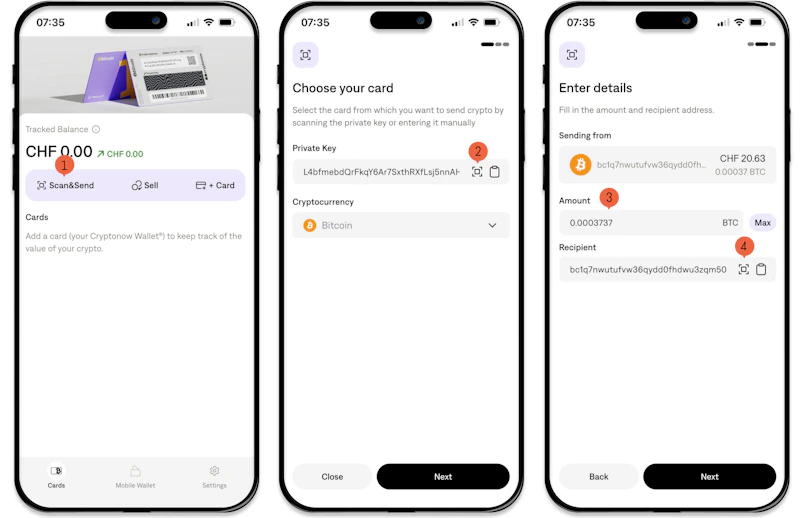
1. Open the Cryptonow Mobile App on your smartphone. In the app, navigate to the Scan & Send function.
2. Hold your Cryptonow card in front of the camera and scan the private key QR code. As soon as the code is recognized, your wallet will be loaded automatically.
3. Enter the amount you want to send.
4. Enter the recipient’s wallet address. Alternatively, you can also scan the address using a QR code.
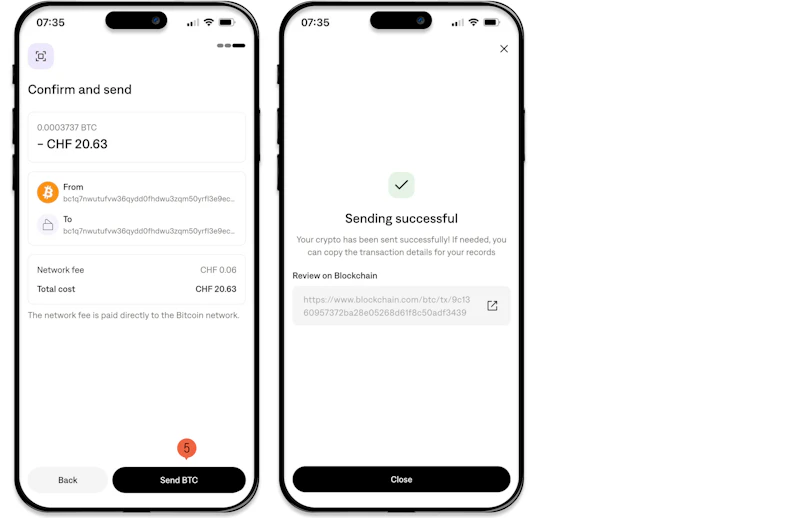
5. Carefully review all details and then confirm the transaction. The crypto-assets will then be sent to the destination address via the blockchain.
Important Note: Please note that after using Scan & Send, it may usually take 15–20 minutes until the crypto-assets become visible at the destination address. Restart the app or check the transaction again after this time to view the current status.