Where can I find my transactions in the app?
With the Cryptonow Mobile App, you can view your transactions at any time. You can also access detailed information about each transaction, including the corresponding blockchain link.
You can use the Cryptonow Mobile App to view your transactions and track all activity related to your wallet.
Step by step Guide
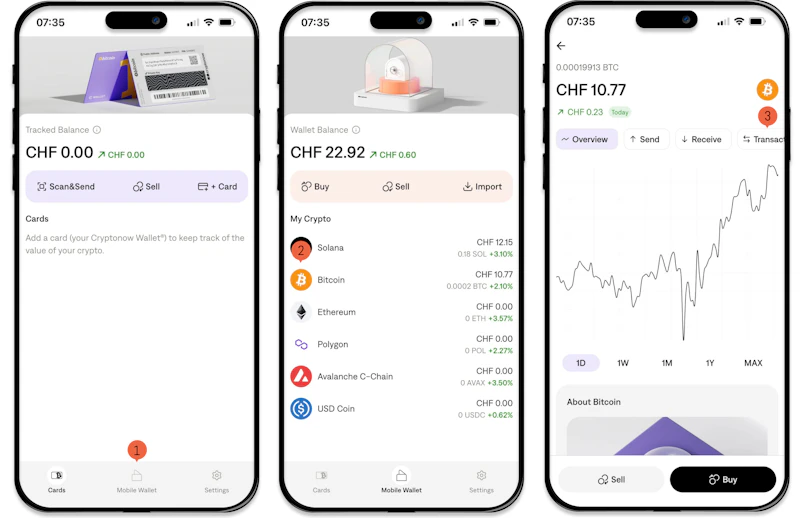
1. Open the Cryptonow Mobile App on your smartphone and tap on “Mobile Wallet.”
2. Select the desired crypto-asset for which you want to view transactions.
3. Tap on “Transactions” to display your transaction history.
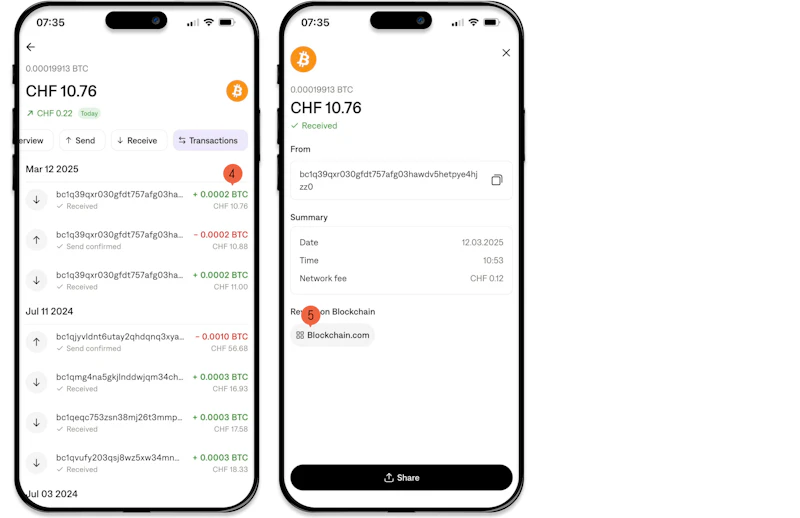
4. Select a transaction to view more details.
5. You will now see the transaction details, including the blockchain link.
Important Note: You can use the blockchain link to view all details of your transaction. Viewing or sharing this information has no impact on your balance your crypto-assets always remain secure in your wallet.