How do I create an app wallet backup?
A wallet backup is essential for securing your cryptocurrencies. It ensures that you always maintain control, no matter what happens. If you lose your smartphone, it gets stolen, or you encounter technical issues, you can still access your cryptocurrencies using the wallet backup.
Ein Backup für deine Cryptonow Wallet App anzulegen, ist von wichtiger Bedeutung, um die Sicherheit deiner Kryptowährungen jederzeit zu gewährleisten. Wenn du dein Smartphone verlierst, es gestohlen wird oder technische Probleme auftreten, kannst du mithilfe des Wallet-Backups trotzdem auf deine Kryptowährungen zugreifen.
Ein verlorenes oder gestohlenes Smartphone muss nicht bedeuten, dass deine Investition verloren ist. Das Wallet Backup ermöglicht es dir, auf einem neuen Gerät problemlos auf deine Kryptowährungen zuzugreifen. Ebenso bewahrt das Backup dich vor unerwarteten technischen Problemen – du kannst deine Wallet auf einem anderen Smartphone wiederherstellen und die Kontrolle über deine Finanzen behalten.
Schritt für Schritt Anleitung
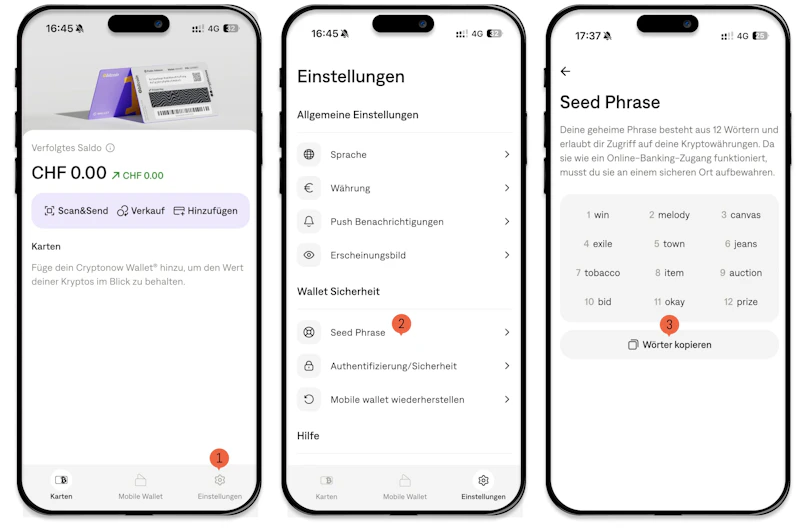
Open "Settings" at the bottom right.
In the settings, you will see the option to select the "Seed Phrase". This step is crucial for viewing and preparing your backup.
Now, you can see your backup recovery phrase in the form of 12 words. These words are like a digital key to your wallet and your cryptocurrencies.
Here's the important part: Write down these 12 words in the correct order, or copy them. Keep them in a secure place where you can be confident they won't get lost or fall into the wrong hands.
Important Security Note:
These 12 backup words are very essential. They are your means of restoring your crypto portfolio if you lose your smartphone, it gets stolen, or you need to uninstall the app for any reason. Cryptonow itself has no way of restoring your cryptocurrencies on your smartphone. You alone are responsible for securely storing these backup words.